Interface Preview
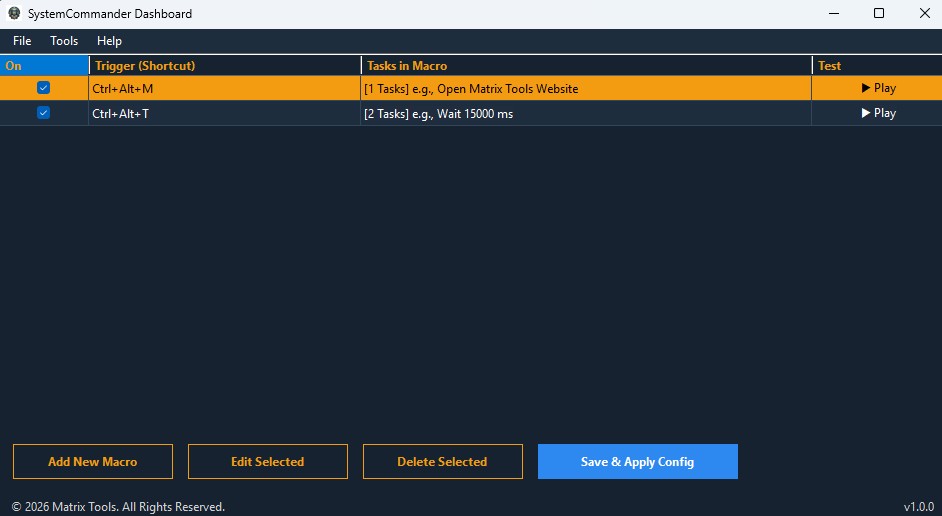
A portable system automation engine that bridges hardware input and system actions to turn your keyboard into a professional command deck.
Download v1.0.0 .ZIP (Free)SHA-256: B48F60FE3A406F96269BAB3868E95C606DA874E9161AE7214BB80E1C3758D01D
50.42 MB Zip • Windows 10/11
To verify hash: Open PowerShell in your download folder and run:
Get-FileHash -Path ".\SystemCommander.zip" -Algorithm SHA256
Intercepts keyboard inputs at the operating system level, allowing you to trigger complex macro sequences regardless of which window is currently in focus.
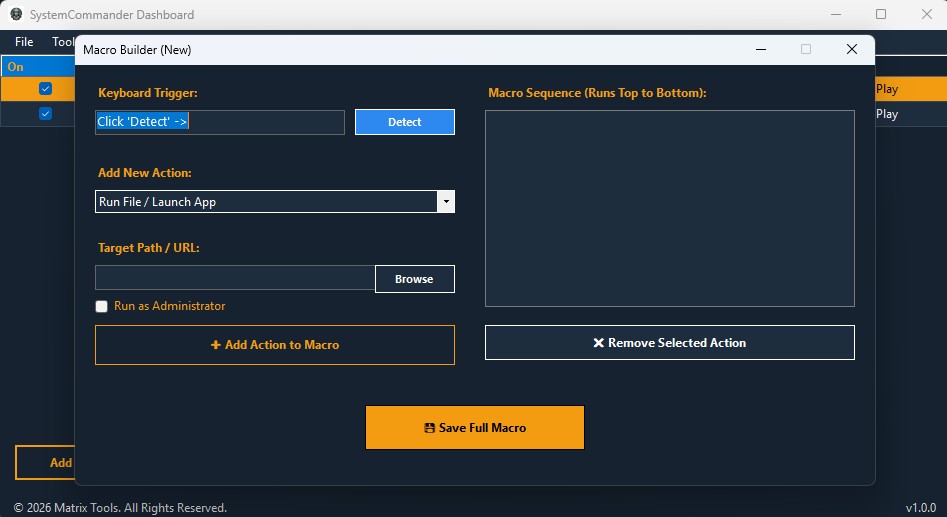
A clean, visual sequence builder that allows you to chain multiple actions together into a single keystroke event, executing from top to bottom.
Instantly spin up executables, local files, or batch scripts with customized startup parameters directly from the keyboard.
Silently execute background PowerShell administration scripts or dynamically open targeted web URLs in your default browser.
All macros and shortcut triggers are saved locally in a flat JSON file, meaning your entire configuration moves with the executable on your USB drive.
No need to guess key codes. Click 'Detect' and press your desired key combination to instantly bind it to the target sequence.
Completely portable C# architecture that requires no registry modifications or administrative installation wizards.
Operates entirely locally. SystemCommander does not require an active internet connection or cloud telemetry to process keystrokes or execute automations.